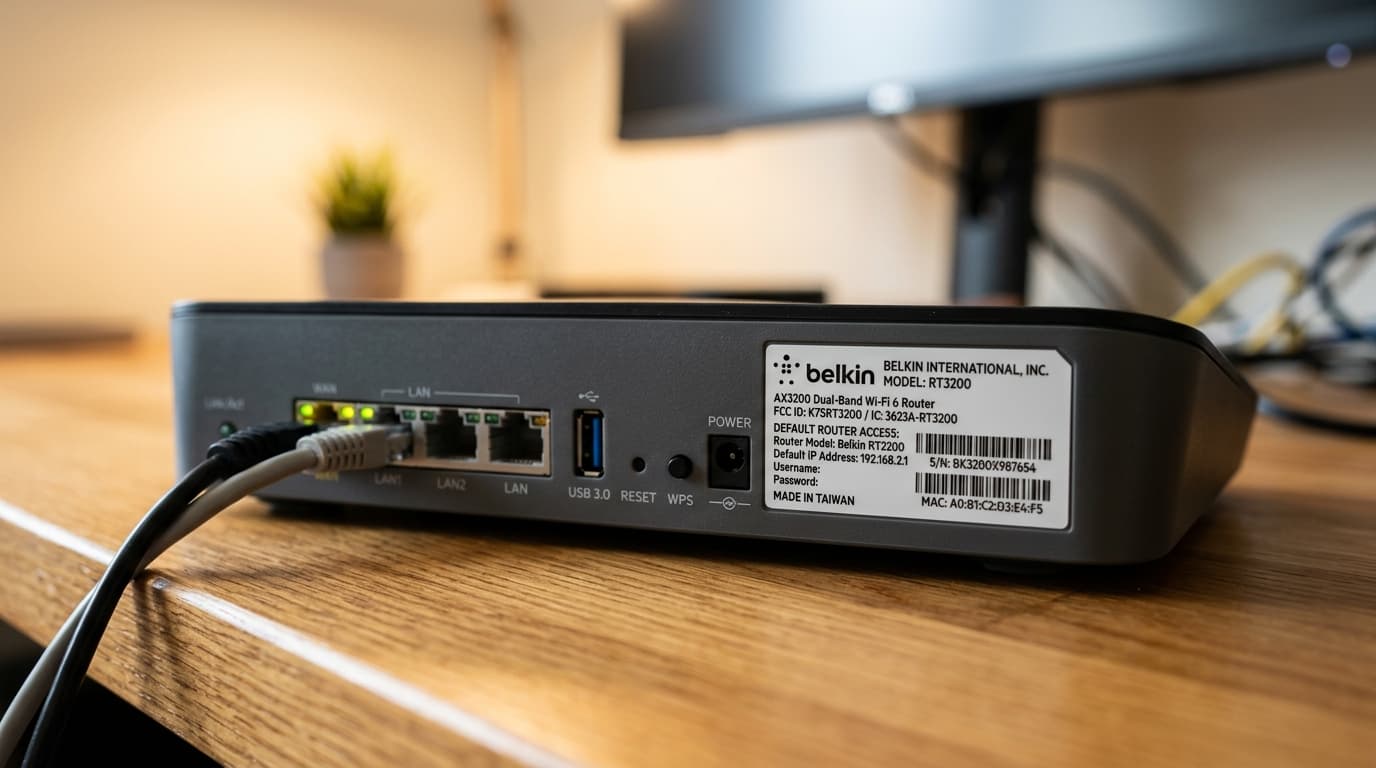
Factory label on a Belkin router displaying the default access address 192.168.2.1 with unassigned blank credentials.
You typed 192.168.2.1 into your browser and either got an error, or reached a login page that doesn't seem to accept anything you type. This address behaves differently from 192.168.1.1 or 192.168.0.1 in two ways that trip people up: Belkin routers often have no username and no password at all, and the address is frequently used on a second router in a two-router setup, where the routing rules are completely different.
192.168.2.1 is the default admin address for most Belkin routers, and it's also used by some Edimax and other brands. To log in, connect to the router, type http://192.168.2.1 into your browser's address bar, and on many Belkin models leave both the username and password fields blank and click Submit. If the page won't load, you're either not connected to that router's network, or 192.168.2.1 isn't your router's actual address — check your Default Gateway to confirm.
First: Which Situation Are You In?
Match your exact symptom below to identify why the admin dashboard is failing before making unnecessary network changes:
| Symptom | Likely cause |
|---|---|
| Login page loads but there's no username or password to enter | Normal for many Belkin models — leave fields blank and click Submit |
| Page doesn't load at all (timeout or connection refused) | Not connected to the right network, or your router's real address is different |
| You added a second router and now can't reach it | The second router likely uses 192.168.2.1 on its own separate network — see the section below |
| Blank fields give an error | The password was changed at some point, or your model has a different default (e.g. admin/admin) |
| Typing router.belkin or "belkin login" goes nowhere | Belkin has no branded login URL — use the IP address 192.168.2.1 directly |
Belkin Logins Often Have No Username or Password
This is the single most common reason people think the login is broken when it isn't.
Many Belkin routers ship with no default password, and some have no username either. The login screen may show a blank form or only a "Submit" button. The correct first-time login on these models is simply to leave everything empty and click Submit — then set a password immediately afterward.
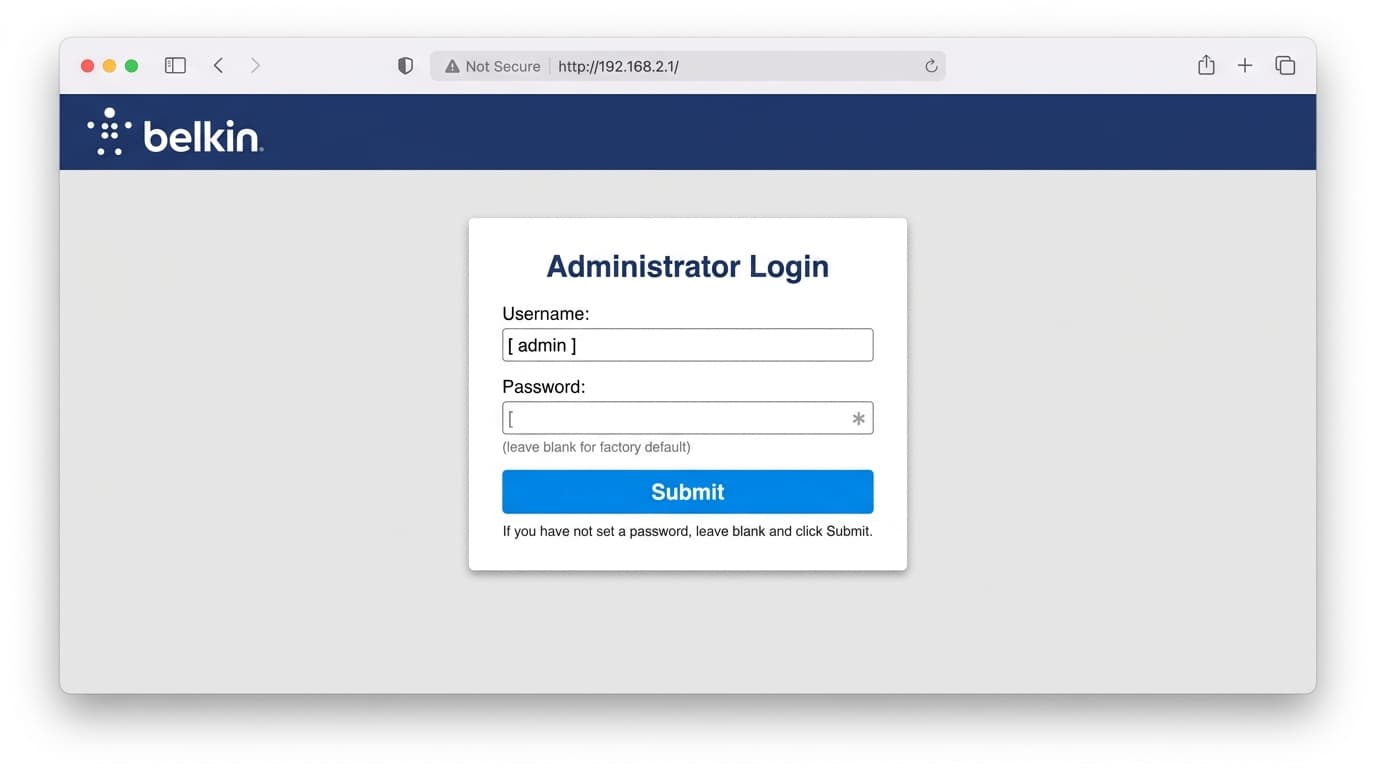
Standard Belkin administrative login console: leave the password field blank and click "Submit" to access initial settings.
Two related mix-ups worth knowing about:
- Belkin does not use a branded login address like
routerlogin.net(Netgear) ortplinkwifi.net(TP-Link). Typingrouter.belkinor searching for a "Belkin login" will not reach your router. belkin.comis the company's corporate website, not your router's admin panel. The only reliable address is192.168.2.1entered directly into your browser's address bar.
Credential variations: Credentials vary by model and firmware build. While many older Belkin units accept blank credentials, some require username admin with a blank password, and certain regional/newer editions use admin / admin. If blank fields fail, test those two combinations, then check the physical label on your device base.
The Second-Router Setup: Why 192.168.2.1 Shows Up There
If you're not using a Belkin router at all and still ended up on this page, this is almost certainly why.
When you connect a second router behind your first (to extend coverage, isolate smart home devices, or add Ethernet ports), both routers can end up attempting to use the exact same address range. If your primary ISP gateway uses 192.168.1.x, a second router also configured on 192.168.1.x creates an IP address subnet conflict — two devices competing for the same network namespace, which commonly causes dropped internet connections or an admin panel that refuses to open.
The standard networking fix is to give the second router its own separate subnet range by changing its LAN IP to 192.168.2.1 (with subnet mask 255.255.255.0). That places it on a dedicated 192.168.2.0/24 network, so the two routers no longer collide, and you reach the second unit's management console at http://192.168.2.1.
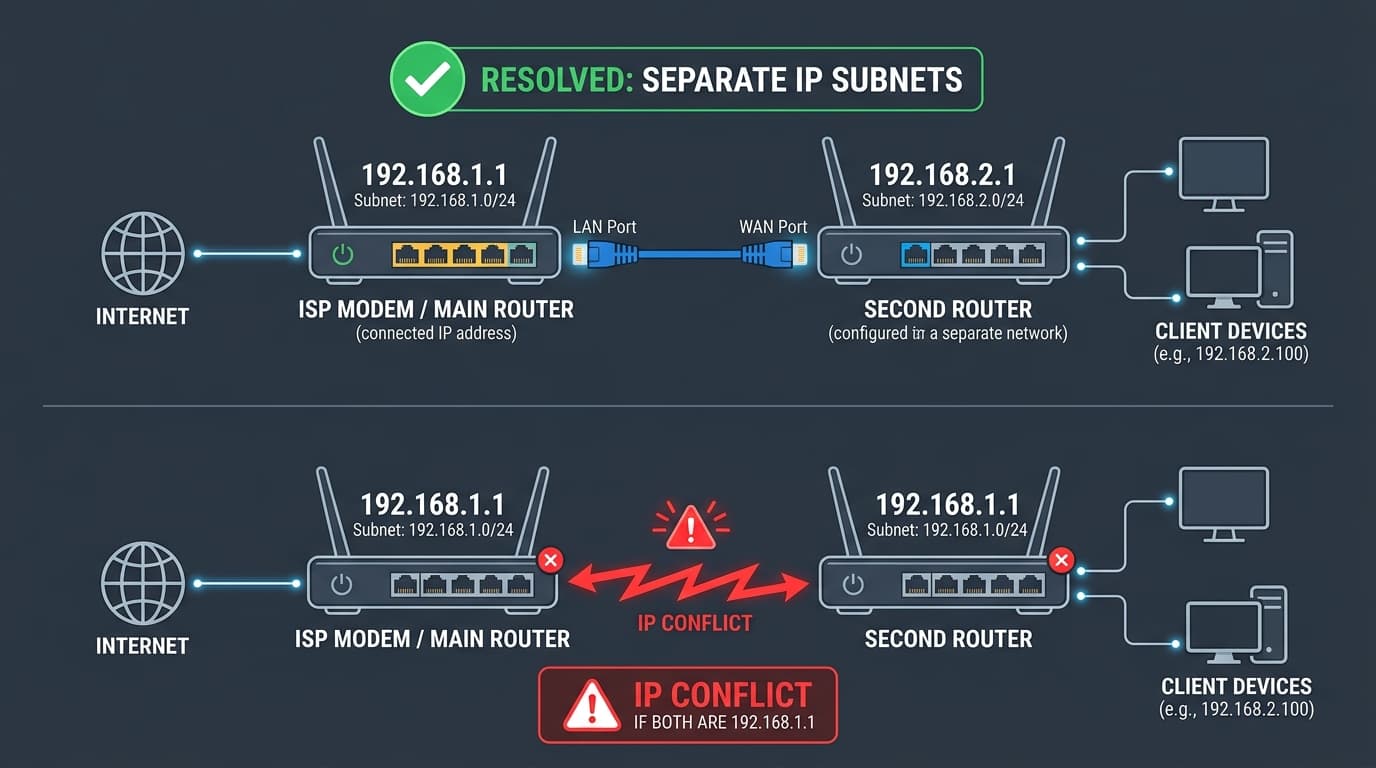
Cascaded router topology: Isolating the secondary router onto 192.168.2.1 resolves DHCP conflicts with the primary gateway at 192.168.1.1.
Critical routing rule: If you did this and now can't reach the second router, remember: it is reachable at 192.168.2.1 only while you are connected to that router's own Wi-Fi or Ethernet ports. From a computer or phone connected to your main router's network (192.168.1.x), requests to 192.168.2.1 will not cross the firewall boundary and will simply time out.
This is the exact same type of address overlap that causes trouble on AT&T fiber gateways at 192.168.1.254. If you want to calculate network and broadcast ranges for your custom subnets, use our interactive IP Subnet Calculator.
Step-by-Step Fix (In the Order That Actually Works)
1Confirm You're on the Right Network
Connect directly to the router you're trying to reach — over Wi-Fi or Ethernet, not mobile cellular data and not a different router's network. If configuring a secondary router, unplug from the main network and connect straight into one of the second router's numbered LAN ports.
2Type the Address Into the Address Bar
- Open any web browser (Chrome, Edge, Safari, Firefox).
- Click directly into the top address bar (not the Google or Bing search box).
- Type
http://192.168.2.1and press Enter.
Including http:// explicitly stops modern mobile browsers from misinterpreting the IP as a search query.
3Log In
| Brand / Hardware | Username | Password |
|---|---|---|
| Belkin (many models) | (blank) or admin | (blank) |
| Belkin (some models) | admin | admin |
| Edimax | admin | 1234 |
Always check the label on the device first — it overrides generic defaults.
4If It Won't Load, Check Your Real Gateway
If 192.168.2.1 does not respond, verify what address your device received via DHCP:
- Windows: Open Command Prompt, run
ipconfig, and find IPv4 Default Gateway. - Mac: System Settings → Network → Wi-Fi → Details → TCP/IP → Router.
- iPhone / iPad: Settings → Wi-Fi → tap (i) icon → Router.
- Android: Settings → Wi-Fi → tap network → Advanced → Gateway.
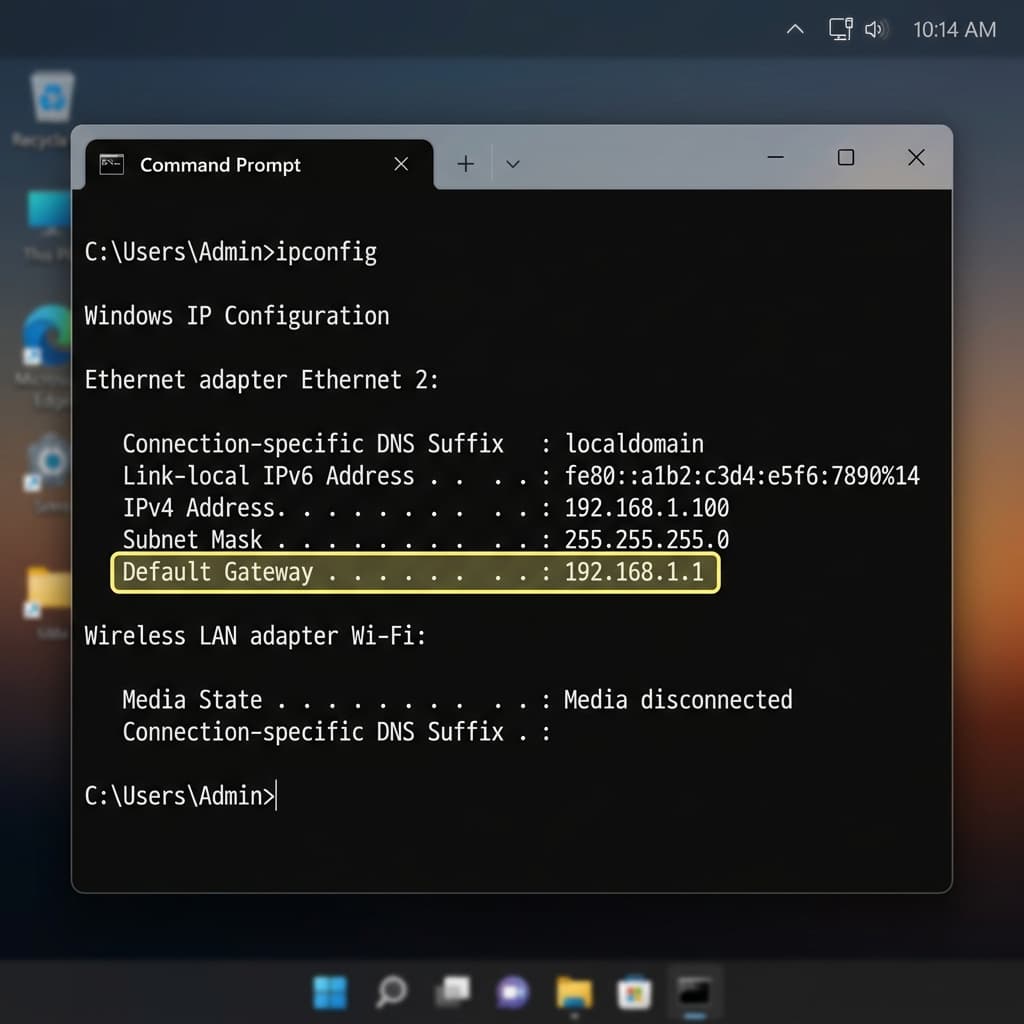
Whatever number appears is the address to use. If it isn't 192.168.2.1, that is why the page won't load. You can also run our automated Gateway Checker.
5Try a Different Browser or Incognito Window
A cached session or mobile browser extension can stop the page from loading. Open an Incognito / Private window or try another browser.
6Turn Off Any VPN
VPNs reroute local traffic away from your router gateway. Disconnect any active mobile or desktop VPN before reloading.
7Locked Out? Factory Reset
- Find the small recessed reset button on the router.
- Press and hold for about 10 seconds while the router is powered on.
- Release and wait 2 to 3 minutes for it to reboot.
- Log in again using the default credentials from the label.
Note: A reset erases your custom Wi-Fi network name, passwords, and any second-router address changes, so you may need to reconfigure the 192.168.2.1 range afterward.
Router Model & Specification Reference Table
Reference database of hardware models using 192.168.2.1:
| Router Model | Gateway IP | Default User | Default Password | Factory SSID |
|---|---|---|---|---|
| Belkin N300 (F9K1002) | 192.168.2.1 | (blank) | (blank) | belkin.xxx |
| Belkin N600 Dual-Band (F9K1102) | 192.168.2.1 | (blank) | (blank) | belkin.xxx.media |
| Belkin AC1200 / AC1800 (F9K1113) | 192.168.2.1 | (blank) | (blank) | belkin.xxx |
| Belkin RT3200 / E8450 (WiFi 6) | 192.168.2.1 | admin | Printed on label | Belkin_setup |
| Belkin Play Max / Share Max (F7D4301) | 192.168.2.1 | (blank) | (blank) | Belkin_PlayMax |
| Belkin Surf N300 (F7D2301) | 192.168.2.1 | (blank) | (blank) | Belkin_Surf |
| Edimax BR-6428nS / BR-6208AC | 192.168.2.1 | admin | 1234 | edimax.setup |
| SMC Barricade SMCWBR14S-N4 | 192.168.2.1 | admin | smcadmin | SMC |
What to Do Once You're Logged In
- Set an admin password: If you logged in with blank fields, anyone on your network can do the same — this is the first thing to fix.
- Change your Wi-Fi name and password: Use WPA2 or WPA3 encryption if your router supports it.
- Check for firmware updates: Belkin has largely stopped making new routers, so updates for older models may no longer be offered. Check Belkin's support page for your exact model.
- Consider replacement for very old hardware: A router that no longer gets security updates is a risk, especially with a well-known default login.
Frequently Asked Questions
What is the default login for 192.168.2.1?
On many Belkin routers there is no username and no password — leave both blank and click Submit. Some models use admin with a blank or admin password, so check the label if blank fails.
Why does 192.168.2.1 not load?
You're usually not connected to that router's network, or its real address is different. Check your Default Gateway with ipconfig (Windows) or your network settings on Mac or mobile.
Is 192.168.2.1 only for Belkin routers?
No, though Belkin is the most common. It's also used by some Edimax and other brands, and it's a common choice for the LAN address of a second router behind a main one.
Why do I use 192.168.2.1 for a second router?
Two routers on the same address range conflict. Giving the second router its own range, such as 192.168.2.x, keeps the two networks separate so both work.
Is there a Belkin login website like routerlogin.net?
No. Belkin has no branded login address. belkin.com is the corporate site, and the router's admin page is only reachable at 192.168.2.1.
Is it safe to leave a Belkin router with a blank password?
No. A blank password means anyone connected to your network can open the admin page. Set a strong admin password right after your first login.
I forgot my password — what now?
A factory reset using the recessed reset button is the only reliable way back in. It erases your settings, so you'll set the router up again afterward.
The Bottom Line
192.168.2.1 is usually a Belkin router, and on many of them the right login is simply nothing: blank username, blank password, click Submit. If you reached this page from a second-router setup, remember that address only works from inside that router's own network. In both cases, set a real admin password as soon as you're in.